Word Search: Word Find
- 4.8
- Rating
- 500.00K
- Installs
- Free
- Price
 Analysis by App-foxy
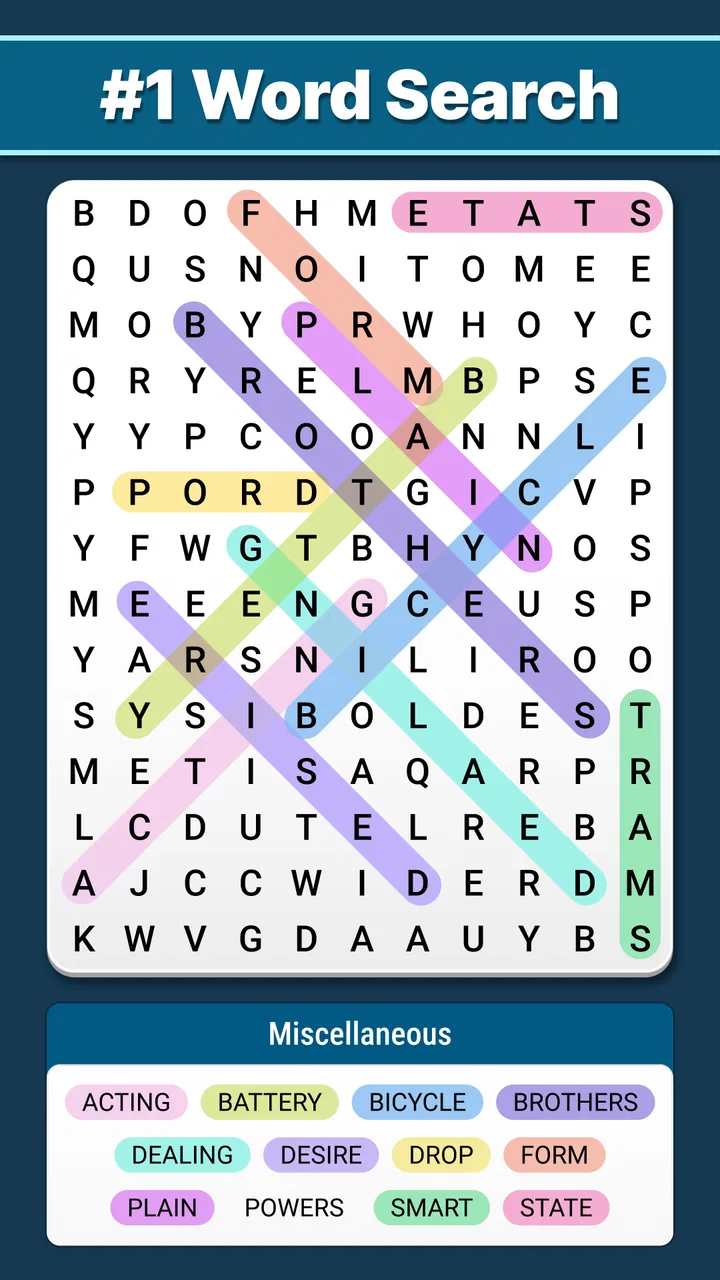
I usually reach for a word search game when I want something quiet rather than competitive. That is the space where Word Search: Word Find makes sense: it is a free word puzzle from Puzzle Cats, built around the familiar task of finding hidden words in a letter grid. I found it easy to understand within moments, which is important for a game meant to fill a short break instead of demanding a long tutorial.
The basic appeal is straightforward, but the choice is not quite as simple as “free equals good.” A word search game has to fit the way you like to play. Some people want a calm screen and a traditional puzzle; others want timed pressure, social competition, elaborate progression, or a broader collection of mini-games. My experience with this title is that it is strongest when you want a dependable, low-friction brain exercise and weakest when you expect a large, constantly changing game system.
How I decided whether it was worth keeping
Before recommending any puzzle app, I look at four things: how quickly I can start, whether the central activity stays pleasant over repeated sessions, how much attention it demands, and whether its limitations become irritating after the novelty fades. Word Search: Word Find performs well on the first and third points. I can open it and begin looking for words without learning complicated rules, and the activity suits short sessions on a bus, during a coffee break, or while winding down in the evening.
You May Also Like

 Blood Strike: 2.5 Anniversary
Blood Strike’s Loadouts Turn Every Drop Into a Tactical Gamble
A close look at Blood Strike’s custom loadouts: how fast access to signature weapons reshapes its battle royale rhythm, rewards preparation, and narrows the gap between fights.

 Pandora - Music & Podcasts
Pandora’s Music Is Easy to Start, but Harder to Recover
Pandora’s strength is its low-effort path from a seed to a station. Its weak spot is how much confidence it asks you to place in connection, setup, and quiet recovery.

 8 Ball Pool
 Is Built on Rivalries, Rematches, and Routine
A close look at the rivalries, rematches, shared routines, and unanswered safety questions that turn a quick pool match into a persistent mobile community.

 Samsung Music
’s Quiet Strength Is Playing What You Already Own
Its reach comes less from spectacle than from dependable access to a personal library. That simplicity is both the app’s strongest retention engine and its ceiling.

 AccuWeather: Weather Radar
AccuWeather Review: A Quick, Clear Forecast for Everyday Decisions
For everyday plans, the best forecast is the one you can understand quickly. AccuWeather makes rain timing, radar, and local conditions easy to act on, with a few trade-offs.

 Hill Climb Racing
Why Hill Climb Racing Still Turns Crashes Into One More Run
A tiny car, a bumpy hill and one more upgrade: Hill Climb Racing keeps resurfacing because its simple chaos makes every near-miss feel personal.
More From Our News Desk



The more important question is whether the classic format itself is enough for you. This is a word search game, not a general vocabulary course or a story-driven adventure. Its value comes from scanning letters, recognizing patterns, and completing a puzzle at your own pace. If that simple loop is satisfying, the lack of extra complexity feels like a benefit. If you need constant novelty, it may feel narrow.
I also considered how approachable it is for different players. The Everyone content rating makes it a comfortable option for families and casual players, while the minimum operating-system requirement of Android 6.0 keeps it accessible on many older Android devices. Puzzle Cats has maintained the game through version 7.5, and its presence on the platform is substantial, with over 500 thousand installs. Those details do not prove that every player will enjoy it, but they do make it feel like an established choice rather than an obscure experiment.
The store shows an average rating of 4.8 from around 11 thousand ratings, alongside 595 written reviews. I treat that as a useful signal of broad satisfaction, not a guarantee. Word games are personal: someone who enjoys spotting diagonal words may love the relaxed format, while a player who wants rapid action will judge the same design very differently.
The first minutes are its biggest strength
What I like most is the low entry cost in terms of attention. There is no need to remember a complicated control scheme. The familiar interaction—searching the grid and selecting the words you identify—lets me focus on the puzzle immediately. That matters when I only have a few minutes and do not want to spend the entire break navigating menus or understanding a progression system.
This simplicity also makes it suitable for people who are new to mobile games. I could hand the phone to someone who already knows paper word searches and expect them to understand the objective quickly. It is also a reasonable choice for older relatives who prefer recognizable puzzle formats over fast reflex games, although screen size and visibility will still affect comfort on a particular device.
Another advantage is the way the game can occupy different lengths of time. I can treat one puzzle as a small mental reset, or continue when I am in the mood to search more carefully. That flexibility is more useful than it sounds. A title that only works in long sessions tends to disappear from my phone, while this one fits naturally into the gaps of an ordinary day.
Why the classic format remains useful
Word searches are often dismissed as basic, but the format has a particular kind of mental rhythm. I scan horizontally, vertically, and diagonally, then switch between broad visual searching and checking a suspected sequence. The activity is not a replacement for structured language study, yet it does encourage attention to spelling and letter patterns without feeling like homework.
One practical tip is to change the way you scan instead of staring randomly at the whole board. I first look for unusual letters or likely starting points, then trace possible directions. When I get stuck, I stop searching for a full word and look for a distinctive pair or ending. This approach makes the game feel less like visual noise and more like a small, repeatable process.
I also prefer playing with a clear stopping point. It is tempting to keep searching simply because one word remains, but that can turn a relaxing activity into a frustrating one. If I am tired, I take a break and return later with fresh eyes. The game works better for me as a calm exercise than as a test of endurance.
Everyday situations where it fits
A realistic example is a delayed appointment. I may have ten minutes, no interest in reading a long article, and little patience for a game that needs sound or rapid reactions. A word search gives me something focused to do without requiring a large commitment. The same applies to a quiet evening when I want to use my phone but do not want a competitive feed or an emotionally demanding story.
It can also work as a shared, informal activity. A parent and child can look at the same puzzle and take turns pointing out possible words, while an adult learner can use the search as a light spelling-focused break. I would not present it as a serious educational tool, but it can complement more deliberate vocabulary practice by making attention to words feel playful.
For commuters, the main trade-off is concentration. A word search is less suitable when you are constantly interrupted, because losing your place in a grid is more annoying than pausing a simple arcade game. In a calm waiting room it works well; in a crowded, stop-and-start environment, a game with shorter rounds may be more forgiving.
Where it wins against familiar alternatives
Compared with a paper word-search book, the phone version is easier to carry and ready whenever I have the device with me. I do not need a pen, a flat surface, or a way to mark completed words. That convenience is the clearest reason to choose it over the traditional alternative. The paper format still has a tactile charm, though, and people who dislike screens may reasonably prefer it.
Compared with crossword games, this title asks less from general knowledge. A crossword can reward vocabulary, clues, and cultural recall, but it can also stop me completely when I do not know an answer. Word Search: Word Find is more forgiving because the challenge is visual recognition rather than solving a clue from scratch. That makes it better for relaxed play, while crossword fans may find it too undemanding.
Compared with anagram or spelling games, it places less pressure on producing words independently. I am looking for words rather than constructing them, so it suits players who enjoy recognition more than recall. The trade-off is that it may not provide the same vocabulary-building feeling as a game that asks me to form multiple answers from a set of letters.
Against fast arcade puzzles, it wins on calmness and accessibility. There is no need for quick taps or reflexes to enjoy the central activity. The alternative is better when I want excitement, escalating pressure, or a stronger sense of performance. Choosing between them is less about quality than about the kind of mental energy I have at that moment.
Where another category may fit better
I would steer a player toward a different word-game category if they want a measurable learning path. Someone studying a language may benefit more from an app built around definitions, pronunciation, spaced repetition, or sentence use. A hidden-word puzzle can reinforce familiarity with spellings, but it does not by itself explain meaning or teach how a word behaves in context.
I would also look elsewhere for people who need social motivation. Players who enjoy leaderboards, head-to-head rounds, or sharing results may find a solitary word search less engaging. Likewise, anyone searching for a narrative experience should choose a story puzzle rather than expecting the grid to provide characters, plot, or emotional progression.
There is a separate issue for players who want deep control over difficulty. The attraction of this game is its straightforward presentation, but that same simplicity can feel limiting if you want to tune every puzzle variable or build a personal training routine. In that situation, a more specialized puzzle platform may justify the extra menus and complexity.
My advice is to identify the reason you are downloading a word game. If your answer is “I want a familiar puzzle I can play quietly,” this title is a strong match. If your answer is “I want to master vocabulary, compete with friends, or experience a rich system,” the usual alternatives in those categories are likely to serve you better.
The free download and the practical cost
The game is free to download, which makes trying it easy. However, in-app purchases range from $0.99 to $49.99 per item. That is worth remembering before treating the game as entirely cost-free. I would approach the purchase options as optional spending rather than part of the basic reason to install it, and I would decide in advance whether I am comfortable buying anything during play.
For me, the real cost of switching is not money but habit. If I already use a paper book, a daily crossword, or another word app, moving to this one only makes sense if its convenience and relaxed format solve a specific problem. The phone version is most useful when I want an always-available puzzle and do not want to carry another object. If I already have a favorite app with the exact difficulty and style I enjoy, changing may add little.
There is also a small attention cost in trying to make a simple game serve a purpose it was not designed for. I would not use it as a substitute for a language-learning plan, nor would I expect it to satisfy a competitive player indefinitely. The better approach is to keep the role narrow: use it for short, low-pressure word-search sessions, and choose a second app when you need a different kind of challenge.
Who should install it
I recommend it to casual puzzle players, fans of traditional word searches, families looking for an approachable activity, and anyone who wants a quiet way to occupy a few spare minutes. It is especially appealing if you prefer recognition and visual scanning over clues, anagrams, or time-sensitive tapping. The free entry point makes it reasonable to test without committing immediately.
I would be more cautious for players who quickly tire of repeated formats. If you need a strong narrative, competitive features, detailed learning feedback, or a wide range of puzzle mechanics, this may not hold your attention for long. The game’s identity is its simplicity, so expecting it to behave like a full vocabulary trainer or a broad puzzle collection will lead to disappointment.
For a better first session, I suggest playing when you are alert enough to notice patterns but not so rushed that every pause feels irritating. Use a larger screen if small letters strain your eyes, and take a break when you begin scanning without a method. Those small choices make the classic format more comfortable and reduce the chance that a relaxing puzzle becomes a chore.
My recommendation after using it
Word Search: Word Find is a good choice when calm, familiar puzzle play matters more than variety. Puzzle Cats has kept the concept focused, and that focus is exactly why I can recommend it to the right person. It starts quickly, suits short sessions, works for a broad age range, and offers a recognizable alternative to more demanding word games.
I would not call it the best word app for everyone. Players seeking serious vocabulary development, social competition, or constant mechanical change should compare it with alternatives designed around those goals. But if you want to open your phone, search a letter grid, and give your attention a gentle workout without learning a complicated system, it earns a place on the shortlist.
My final decision is simple: install it if you enjoy classic word searches and want a convenient mobile version for everyday breaks. Keep your expectations centered on that experience, remember that optional purchases are available, and judge it by how pleasant the searching feels rather than by features it was never meant to provide. For that specific use, I find it easy to recommend.
FAQs for Word Search: Word Find
01What is Word Search: Word Find and how does it work?
Word Search: Word Find is a classic puzzle game that challenges players to find hidden words within a grid of letters. Players can choose from various themes and difficulty levels, making it suitable for all ages. The game tracks progress and offers hints to help find elusive words, providing a fun way to improve vocabulary and cognitive skills.
02Is Word Search: Word Find free to play?
Yes, Word Search: Word Find is free to download and play. However, it offers in-app purchases for additional features such as removing ads, unlocking premium themes, or purchasing hints. These options enhance the gaming experience but are entirely optional, allowing players to enjoy the core game for free.
03Can I play Word Search: Word Find offline?
Yes, Word Search: Word Find can be played offline, making it a great option for entertainment during travel or in areas with limited internet connectivity. Players can access previously downloaded puzzles and enjoy the game without needing a Wi-Fi or data connection.
04What devices are compatible with Word Search: Word Find?
Word Search: Word Find is available for both Android and iOS devices. It is compatible with most smartphones and tablets running recent versions of these operating systems. Ensure your device has the latest updates installed for optimal performance and to enjoy all features the game offers.
05How does Word Search: Word Find enhance learning?
Word Search: Word Find is not only entertaining but also educational. It helps improve vocabulary, spelling, and pattern recognition skills. The game challenges the brain by requiring players to identify words from jumbled letters, enhancing focus and cognitive abilities while providing a relaxing yet stimulating activity.
Pros
- Engaging puzzles for all ages.
- Simple and intuitive interface.
- Daily challenges to keep interest.
- Offline play mode available.
- Supports multiple languages.
Cons
- Ads can be intrusive at times.
- Limited themes in the free version.
- No multiplayer option available.
- Some puzzles repeat frequently.
- Lacks advanced hint options.

Word Search: Word Find
Gallery